RSVP Management
Plain-language guide for managing invitation-based attendance workflows.
Overview
The RSVP Management module handles invitation‑based attendance workflows for private or controlled-access events. It orchestrates:
- Invite list creation
- Email invitations with unique token links
- Guest response capture (Yes / Maybe / No)
- Optional follow‑up form data collection
- Reminders to non‑responders
- Capacity enforcement
- Conversion of accepted invitees into Guest / Ticket records
Why RSVP Management?
- Control access and enforce capacity for private or high‑demand events
- One‑click Yes/Maybe/No via secure token links for a frictionless UX
- Collect structured data with tag‑bound RSVP forms
- Automate reminders to boost response rates
- Maintain brand control with customizable Yes/Maybe/No pages
- Seamlessly convert accepted invitees to Guests/Tickets
- Measure outcomes with filters, exports, and dashboards
Quick Start
- Go to Event > RSVP.
- Create a campaign and audience.
- Send invitations and track responses.
Quick Start (for Event Managers)
- Prepare tags for invite segments (VIP, Speaker, Media)
- Configure RSVP Messages (Yes/Maybe/No) for branding
- Optionally build RSVP Forms and bind to tags
- Add/import invitees and assign tags
- Send invitations with Yes/Maybe/No links
- Monitor responses and send reminders
- Export RSVP data or convert accepted invitees to Guests/Tickets
Screenshots


Navigation Cheatsheet
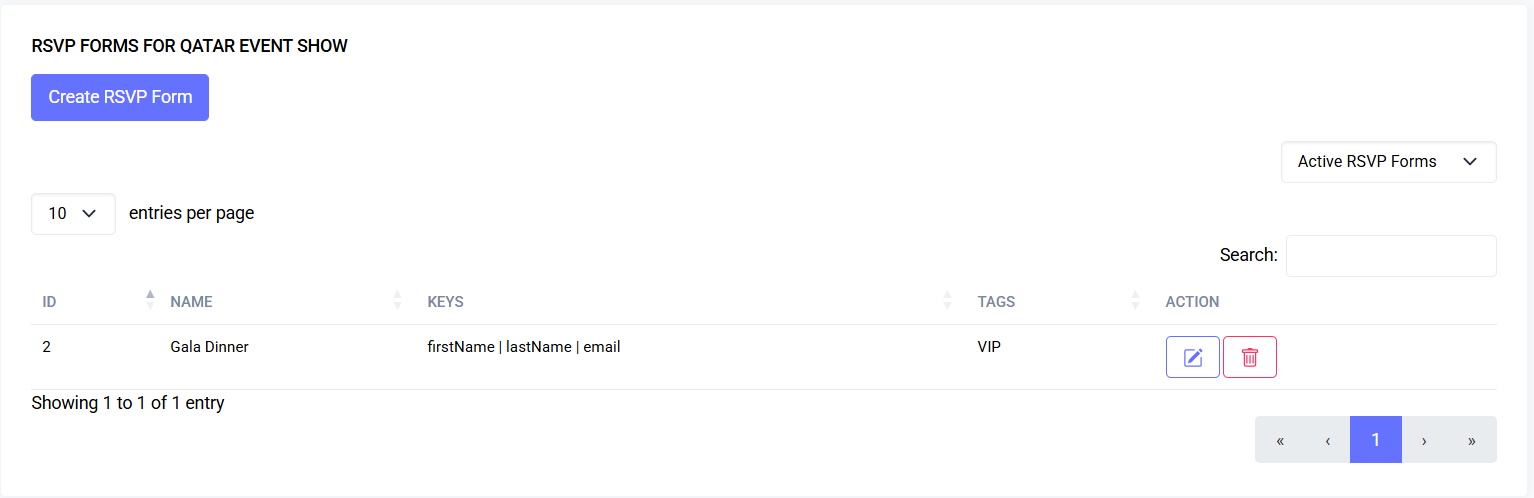
- Forms: Event > RSVP > Forms (manage form schemas, tag bindings)
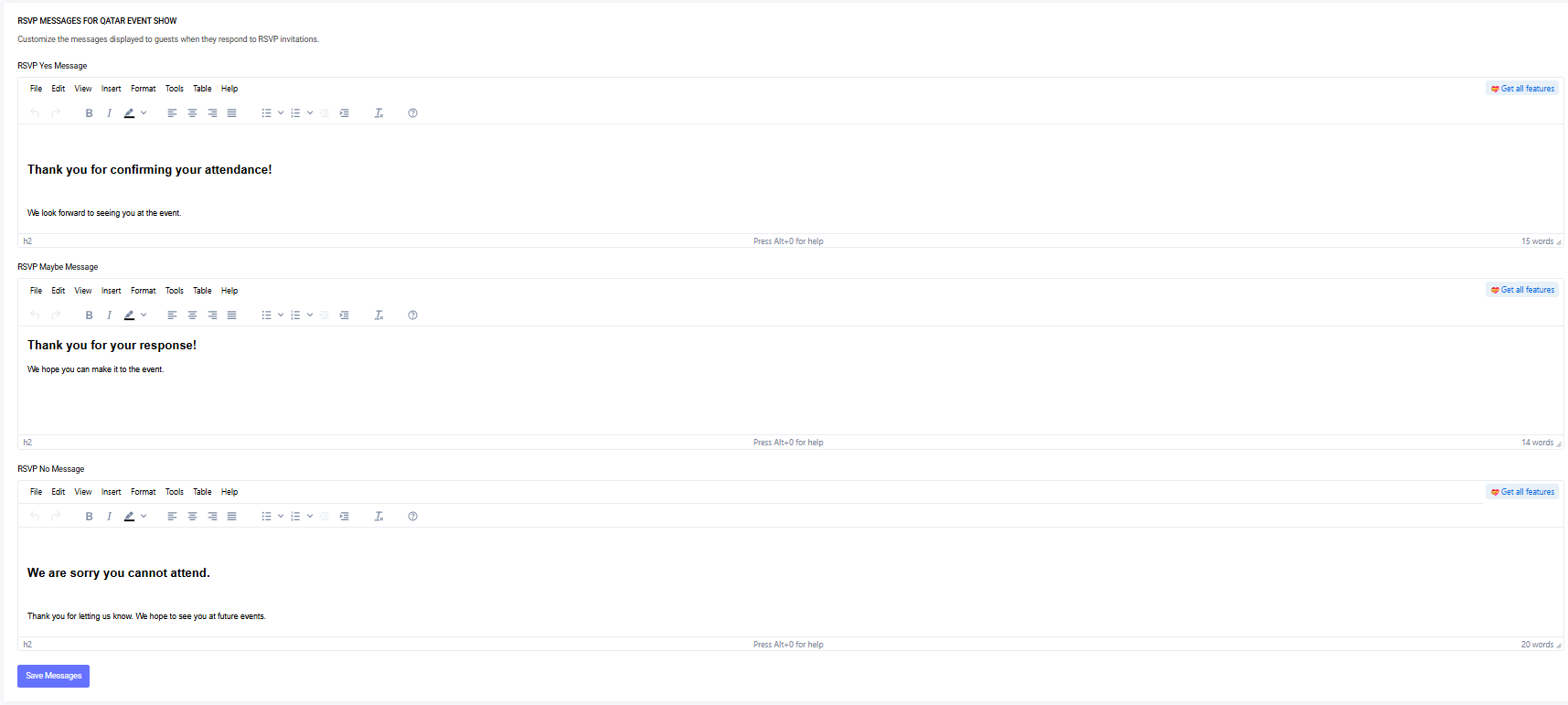
- Messages: Event > RSVP > Messages (edit Yes/Maybe/No pages)
- Data: Event > RSVP > Data (view/filter/export collected answers)
- Invitations/Email: Event > RSVP > Invitations (send initial + reminders)
Tip: Missing actions usually indicate a missing permission. See Permissions Mapping below.
Common Tasks
Create and Attach a New RSVP Form
- Go to Event > RSVP > Forms and click “Create RSVP Form”
- Enter a form name
- Choose target tags (tags without an existing form appear)
- Build the schema with drag‑and‑drop:
- Pre-Defined Fields: First Name, Last Name, Email, etc.
- Basic/Advanced fields: text, number, select, datetime
- Configure validation per field
- Click Save RSVP Form; tags are now bound
Edit an Existing Form
- Click Edit on a form
- Adjust name, tag bindings, or fields
- Save; prior submissions remain intact
Soft-Delete, Restore, Permanently Delete
- Delete: soft-delete (row turns grey, “Deleted” badge)
- Restore: restore soft-deleted forms
- Permanently Delete: remove entirely (cannot undo)
Customize Yes/Maybe/No Messages
- Go to Event > RSVP > Messages
- Edit HTML for each status (Yes/Maybe/No)
- Save; changes apply immediately
Send Invitations and Reminders
- Prepare invite list (manual add or CSV import) and assign tags
- Compose email template with merge variables:
`{{ first_name }}`,`{{ yes_link }}`,`{{ maybe_link }}`,`{{ no_link }}`,`{{ event_title }}`
- Send initial invitations (pending)
- Later, send reminders to pending or maybe invitees
Review and Export RSVP Data
- Go to Event > RSVP > Data
- Filter by tag and RSVP Status
- Click Export (Excel/CSV)
Convert Accepted Invitees
- Use Convert action to create Guest/Ticket records
Guest Experience
- Clicking Yes/Maybe/No updates RSVP status and shows the corresponding message page
- If the tag has a bound RSVP Form, follow-up form appears for Yes/Maybe
- Form validates inputs and submits securely
FAQs
- Export button missing: need
rsvp-data.exportpermission - Cannot attach tag: tag can be bound to only one form at a time
- Editing a form breaks past data? No, old responses preserved
- Extra form on Yes/Maybe: tag linked to a form
- Permanently delete a form: use Delete permanently in Forms table
- Link not found errors: ensure full token link is sent
RSVP Dashboard
- Status counters: Pending / Yes / Maybe / No / Expired
- Capacity/progress bars (global & per tag)
- Recent activity
- Quick filters (tag, status, batch)
Workflow
Prepare List → (Optional Import) → Generate/Assign Tags → Create RSVP Messages → Send Invitations →
Responses Arrive (Yes/Maybe/No) → Optional Additional Form → Reminders → Capacity Gate →
Convert Accepted → Export / Analyze → Archive / Close
Core Concepts
| Concept | Description |
|---|---|
| Invitation | Pending invitation tied to email + tag + event |
| RSVP Status | pending, yes, maybe, no, expired |
| Token Link | Unique URL enabling one-click response without login |
| Tag Binding | A tag may link to an RSVP Form |
| RSVP Form | Form.io schema collecting structured data |
| Messages | Custom HTML for Yes/Maybe/No responses |
| Conversion | Create Guest/Ticket from accepted invite |
| Reminder | Follow-up email for pending/maybe |
| Capacity | Optional max accepted responses |
Permissions Mapping
| Action | Permission | Notes |
|---|---|---|
| View Dashboard | rsvp.view | Access list & stats |
| Invite (Create) | rsvp.invite | Manual add or CSV import |
| Send Emails | rsvp.email | Bulk initial + reminders |
| Convert Accepted | rsvp.convert | Promote to Guests/Tickets |
| View Data | rsvp-data.viewAny | RSVP form submissions |
| Export Data | rsvp-data.export | XLSX / CSV |
| Manage Messages | rsvp-message.edit | Edit HTML messages |
| Manage Forms | rsvp-form.create/edit/delete | Build/modify form schemas |
Workflow Detail
- Preparation: define strategy, configure messages, build forms
- Invitation List Creation: manual add or CSV import
- Token Generation: unique URLs for Yes/Maybe/No
- Sending Invitations: filter pending, compose email, dispatch
- Recipient Response: status updated, form displayed if bound
- Additional Data Collection: form submission stored
- Reminders: pending/maybe invitees only
- Capacity Enforcement: global or per tag limits
- Conversion to Guest/Tickets: select yes invitations, run Convert
- Data Review & Export: filter, export CSV/XLSX
- Closing/Archiving: auto-expire pending, archive invitation set
Status Flow
PENDING --> (Yes Link) --> YES
PENDING --> (Maybe Link) --> MAYBE
PENDING --> (No Link) --> NO
PENDING --(Deadline)--> EXPIRED
MAYBE --(Yes Link later)--> YES
YES / NO / EXPIRED (terminal states)
| State | Notes |
|---|---|
| pending | Awaiting response |
| yes | Counts toward capacity |
| maybe | Soft interest |
| no | Decline |
| expired | Deadline passed |
| waitlisted | Accepted but awaiting slot |
Data Model
| Table | Key Fields |
|---|---|
| rsvp_invitations | id, event_id, tag_id, first_name, last_name, email, token, rsvp_status, responded_at, expires_at, rsvp_formio_data |
| rsvp_forms | id, event_id, name, components (JSON schema) |
| rsvp_messages | id, event_id, yes_message, maybe_message, no_message |
Merge / Template Variables
| Variable | Description |
|---|---|
`{{ first_name }}` | Invitee first name |
`{{ last_name }}` | Invitee last name |
`{{ event_title }}` | Event name |
`{{ yes_link }}` | Direct Yes response URL |
`{{ maybe_link }}` | Direct Maybe response URL |
`{{ no_link }}` | Direct No response URL |
`{{ capacity_remaining }}` | Remaining slots (if computed) |
Validation & Edge Cases
| Edge Case | Handling |
|---|---|
| Duplicate email | Skip or update existing |
| Token reuse | Idempotent |
| Token after expiry | Show expired message |
| Capacity reached mid-click | Show full / waitlist |
| Changing tag after invite | Does not retroactively change form mapping |
| Form updated post responses | Old responses preserved |
Security / Integrity
- Tokens are single-use
- CSRF enforced on form POST
- Rate limiting recommended
- HTML messages sanitized
- Exports audited
- Collect only required PII
Performance Considerations
| Area | Optimization |
|---|---|
| Bulk Import | Queue background jobs for >5k rows |
| Reminder Sends | Batch queue jobs |
| Export Flattening | Cache field keys per session |
| Capacity Checks | Use atomic increment / row locking |
Troubleshooting
| Symptom | Cause | Fix |
|---|---|---|
| Links 404 | Route/token trimmed | Re-copy URL from email |
| All links act same | Template replaced variables wrong | Inspect placeholders |
| Capacity exceeded | Missing atomic check | Enable row lock |
| No reminders sent | Queue stopped | Restart workers |
| Exports missing columns | Form fields added after early responses | Re-export |
Best Practices
- Segment invitations by tag
- Send reminders 3–5 days after initial wave; final 24h before deadline
- Minimize form fields
- Convert accepted invitees just before registration opens
- Archive instead of delete
Future Enhancements
- Waitlist auto-promotion
- Multi-language messages
- ICS calendar attachment on Yes
- Real-time capacity webhooks
- Drip reminders
- RSVP analytics dashboard
- Anti-bot token challenge
Last updated: 2025-10-09